
Overview
AI Concierge is an intelligent assistant integrated into the guest app that helps guests quickly find relevant information about the hotel’s services, facilities, products, and activities.
This feature generates responses exclusively from the content configured in the CMS, ensuring that all information provided is accurate, up to date, and aligned with the hotel’s operations. The more detailed the content, the more effective AI Concierge will be.
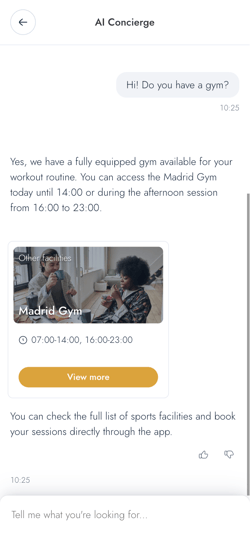
Important: AI Concierge is designed to answer questions, guide guests, and suggest relevant information, but it does not perform actions such as bookings or requests.
Important: The AI is connected to your CMS in real-time. Any changes you make to the content (prices, schedules, or descriptions) are indexed within a few minutes. This ensures that the guest always receives accurate and reliable information.
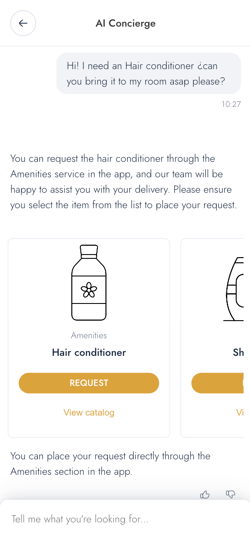
What can you do with the AI Concierge feature
With AI Concierge, you can:
- Answer guest questions automatically
Provide instant responses to common questions using your FAQs and CMS content. - Keep information aligned with your operations
Ensure that responses reflect your current services, schedules, and availability. - Direct guests to relevant services
Guide users to specific services, facilities, or activities available in the app. - Enable access to services from the conversation
Allow guests to open services directly from AI responses and continue with bookings or requests. - Manage the information provided by the AI
Update FAQs and CMS content to control what the AI communicates to guests. - Cover a wide range of guest needs
Use FAQs to address questions that may not be linked to a specific service (e.g., contact details or general information).
Key benefits
- Faster access to information
Guests receive answers immediately, without needing to contact staff. - Consistent information delivery
All responses are based on your CMS content, ensuring consistency across channels. - Better visibility of services
Services are presented within conversations, making them easier for guests to discover. - Reduced repetitive inquiries
Common questions are handled automatically, allowing staff to focus on other tasks. - Easy to maintain
Updates are managed through your existing CMS content, without additional tools or processes.
How to access the AI Concierge feature
To access and manage AI Concierge:
- Log in to the CMS.
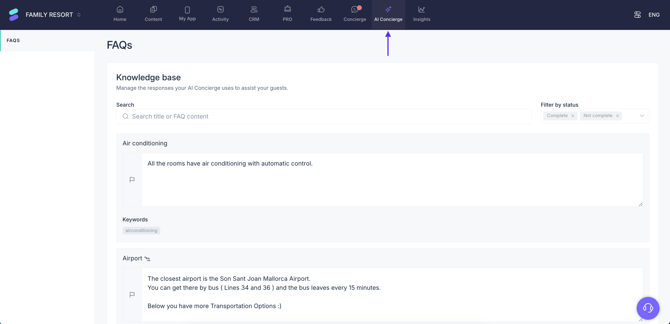
- Click AI Concierge in the top menu with the blue background.
Important: Before you can start using AI Concierge, you need to request its activation. Please contact our Support team through any of these channels:
- Live chat via the CMS.
- Support ticket
Recommended learning path
To get the most out of AI Concierge, we recommend following these articles in order:
-
Learn how to define FAQs and optimize your CMS content to ensure accurate and useful responses.
-
How to make AI Concierge visible to guests
Enable the feature in the guest app and make it accessible to users.
-
How to use the AI Concierge conversation history
Review past interactions to better understand guest needs and improve responses.
-
Understand how guests interact with AI Concierge and what to expect from the user experience.
-
How to use the AI Concierge analytics tool
Track performance and identify opportunities to optimize content and guest experience.
Next steps
To ensure AI Concierge provides accurate and useful responses, the next step is to properly configure the content it relies on.
Continue with the article How to set up AI Concierge to learn how to define FAQs and optimize your CMS content for the best results.
Need further assistance?
If you have additional questions or require further assistance:
- Contact us via live chat
- Send a ticket to our Support team
- Visit STAY Academy, our training platform.