
Overview
The Activities calendar feature allows you to manage and display your hotel’s entertainment and leisure activities such as fitness classes, workshops, and evening shows within the guest app.
This feature ensures that guests never miss out on the experiences the hotel offers by enabling them to set alerts or book their favorite activities in just a few steps. It also simplifies internal operations by allowing your staff to create and manage various calendars and track attendance in real time.
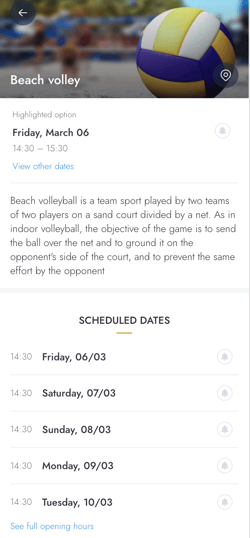
What can you do with the Activities calendar feature?
- Showcase your activities:
Share all the leisure activities offered at the hotel, including recreational, culinary, wellness, and family-friendly events. - Give detailed activity information:
Whether the hotel offer yoga classes, cooking workshops, night shows, or kids' activities, provide guests with specific details and full schedules for every event. - Enable easy bookings and alerts:
Allow guests to book their spot directly through the app or set reminders so they stay informed about upcoming events. - Manage attendance and capacity:
Track the number of people attending each activity, helping the staff manage resources and ensuring activities fill up efficiently. - Organize multiple calendars:
Create various calendars to keep different types of programming such as sports or kids activities structured and easy to navigate.
Key benefits
- Boost activity visibility:
Ensure guests are fully aware of everything happening at the hotel. - Improve guest satisfaction:
Enhance the guest experience by providing a diverse range of easily accessible activities, helping to create memorable stays. - Simplify staff management:
Reduce the time and effort invested in coordinating activities by managing everything from the CMS. - Optimize attendance:
By making activities bookable and visible, you can maximize participation and ensure your sessions are well-attended. - Drive engagement:
Through alerts and easy booking, you encourage guests to interact more with your hotel's services and planning.
How to access the Activities calendar feature
To start using the Activities calendar feature:
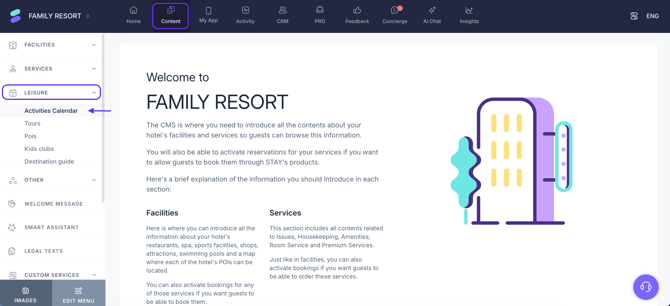
- Log in to the CMS.
- Click Content in the top menu with the blue background.
- Click Facilities in the left-side menu and a drop-down menu will open.
- Click Activities calendar.
Next steps
If you are ready to move forward and create an activities calendar, check out this step-by-step guide to get started.
Need further assistance?
If you have additional questions or require further assistance:
- Contact us via live chat
- Send a ticket to our Support team
- Visit STAY Academy, our training platform.