
Overview
Property operating statuses indicate a property's current operational status within STAY.
These statuses are displayed at the top of the CMS and guest app to help staff and guests understand whether a property is active, under setup, temporarily closed, or no longer operating with STAY.
What do operating statuses indicate?
Property operating statuses help you:
- Identify the current operational status of a property.
- Understand whether a property is available to guests.
- Verify whether a property is still in the setup phase.
- Recognize when a property is temporarily closed or no longer operating with STAY.
Available operating statuses
The following status messages may be displayed:
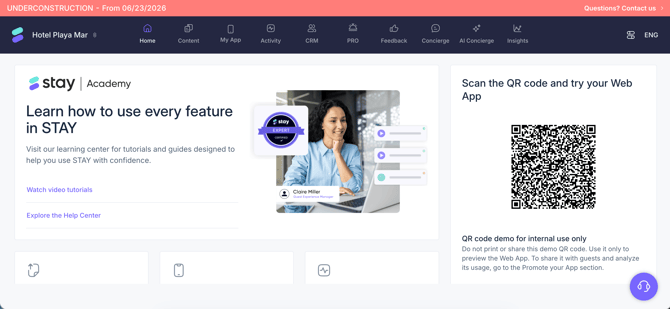
Under construction
This status indicates that the property is currently being configured and is not yet live.
Properties with this status are still in the setup phase before going into production.

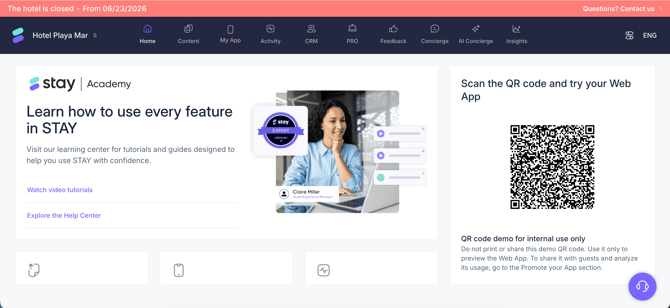
Hotel closed
This status indicates that the property is temporarily closed, typically due to seasonal operations.
The property is not currently being billed during this period.

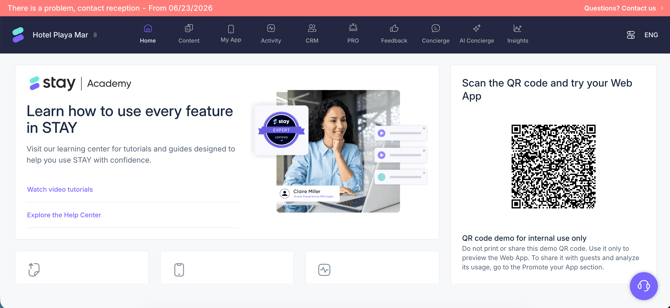
There is a problem, contact reception
This message indicates that the property is no longer operating with STAY and is not being billed.
Guests should contact the reception team directly if they require assistance.

No status displayed
Properties that are active and currently operating with STAY do not display an operating status message.
The absence of a status message indicates that the property is operating normally.
How operating statuses are displayed
Operating status messages are synchronized across STAY platforms and are displayed consistently in:
- CMS
- Guest app
This helps ensure that staff and guests always see the same property status information.
Next steps
Operating statuses are managed by STAY and cannot be modified directly from the CMS.
If you need to change the operating status of a property, contact the STAY Support team or click Contact us in the status banner, if available.
Need further assistance?
If you have additional questions or require further assistance:
- Contact us via live chat
- Send a ticket to our Support team
- Visit STAY Academy, our training platform